How personalized emails win hearts and saves you time
If you’ve ever stared at your email-platform dashboard, wondering how you can send “just one more” newsletter but find it takes forever, you’re not alone. For solopreneurs and small business owners, sending personalized-feeling emails often seems like a luxury: customized subject lines, tailored content, segmentation, behavior triggers—all of it sounds good, but the time commitment? Not so much.
The good news: you don’t have to spend hours making your email marketing feel personal. In fact, you can set up systems that feel one-to-one, build trust, and convert, while still staying sane. In this article, you’ll learn what makes email marketing feel personal, why it matters, and a practical roadmap to pull it off this week.
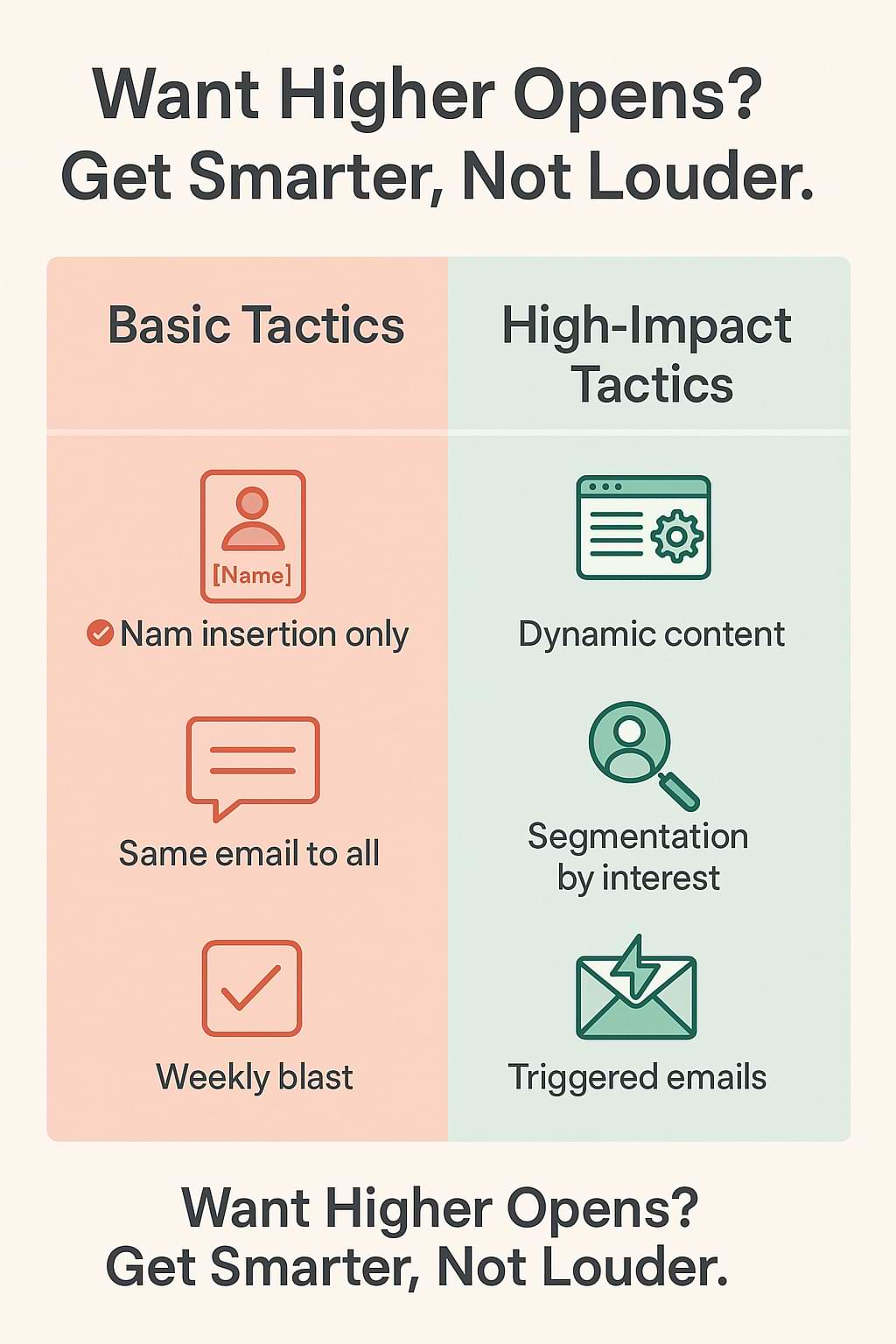
Personalized email marketing works—but many small teams think it requires artisanal effort, and so they fall back to generic blasts. Yet generic emails get ignored. For example, research shows that lifecycle and behavior-based personalization (not just “Hi [FirstName]”) is what really moves the needle.
Meanwhile, other research shows that 61% of consumers will abandon brands that don’t seem to understand their needs. That means if your emails feel like one-size-fits-all, you risk being ignored or even unsubscribed. On the flip side, manually customizing each message becomes unscalable. The challenge is how to deliver personalized, relevant email experiences without spending hours crafting each one.
Email Marketing That Feels Personal Explained
Let’s break down what we mean by “email marketing that feels personal.” This tactic combines segmentation, behavior-triggered content, and automation workflows so that each subscriber sees something relevant, timely, and human-feeling—even though you set things up once and let the system run.
Why it works:
-
People expect relevance. Simply inserting the recipient’s first name isn’t enough anymore. Industry writing calls out lifecycle marketing (sending different messages depending on where the subscriber is in their journey), segmentation (grouping subscribers by interest/behavior), and dynamic content (the email content adapts) as must-haves.
-
Time advantages. A recent piece shows that automating these workflows allows you to deliver right-time messages (“welcome,” “abandoned cart,” “thank you”) that seem custom without requiring manual sends. (Social Media Examiner)
-
Better engagement + ROI. For example, one article reported that personalized lifecycle campaigns achieved click-through rates 41% higher than generic ones.
In short: you build a few smart flows that adapt to what the subscriber does (or doesn’t do), and the result feels personal—without repeating heroic manual work each send.
Step-by-Step Implementation
Here’s how you can implement this in your small business. Even doing one flow well is better than doing many poorly.
H3 Step 1: Map your subscriber journeys
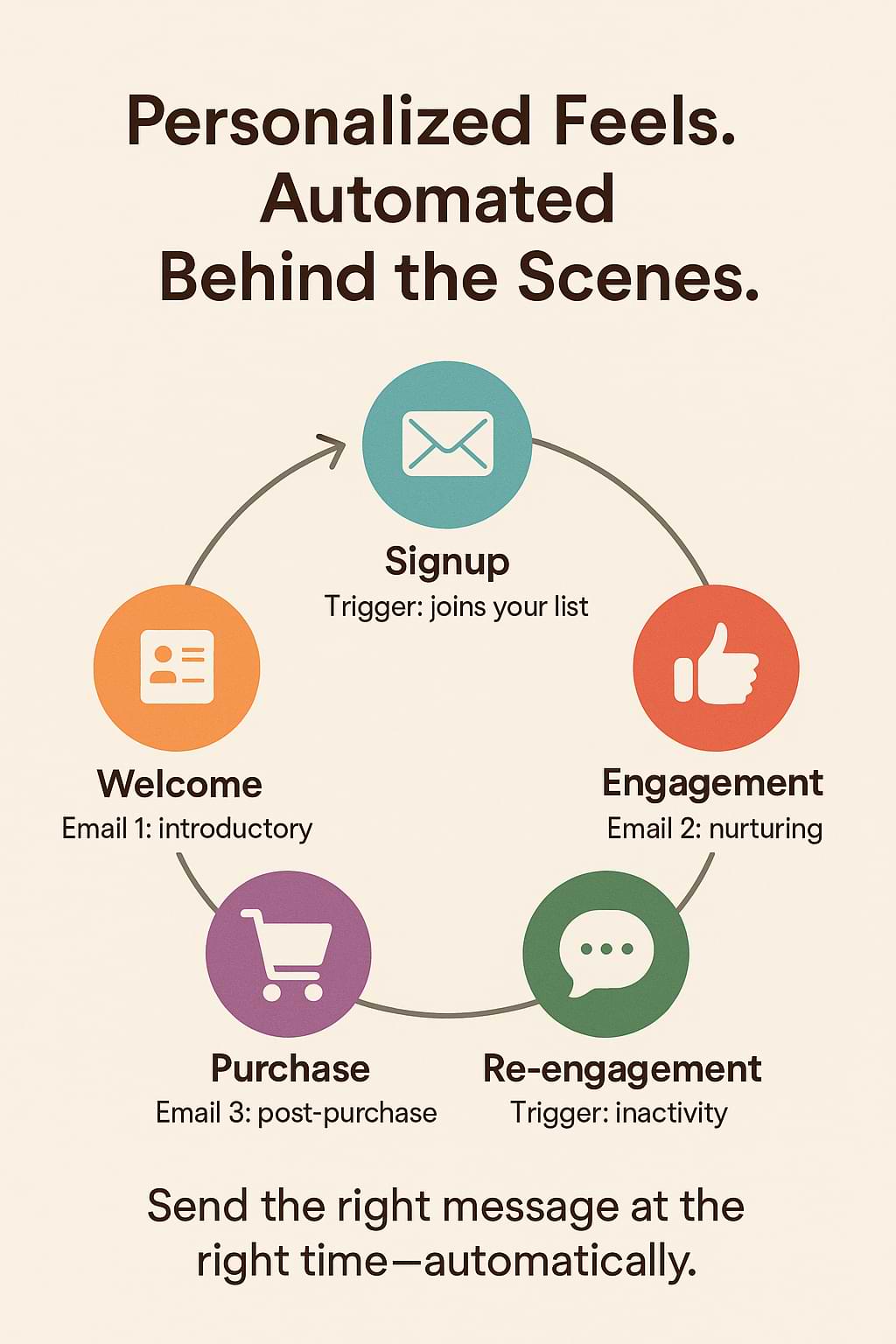
Before you launch anything, sketch out 2-3 key journeys your audience takes. For example:
-
New subscriber → welcome sequence
-
Customer who buys → post-purchase nurture
-
Subscriber who hasn’t opened anything in 30 days → re-engagement
Decide: what actions trigger movement (signup, purchase, no opens, page visit) and what next message would feel most helpful.
H3 Step 2: Segment and tag upfront
In your email tool (e.g., ConvertKit, ActiveCampaign, Brevo) create tags/segments like “New subscriber,” “Bought product A,” and “Inactive 30d.” Set up a basic segmentation rule: if a subscriber downloads a guide on topic X, tag X. This lets you tailor content later. Even basic segmentation gives a big lift.
H3 Step 3: Build your automation workflows
Pick your first journey (say, New subscriber). Create 2-3 emails that go out automatically:
-
Email 1: Immediately after signup. Thank them, set expectations (“You’ll get 1-2 emails/week on this topic”), maybe ask a quick preference, or show your best content.
-
Email 2: 2-3 days later. Show social proof or a helpful resource based on what they signed up for.
-
Email 3: ~one week later. Offer a “next step” (e.g., free consult, sale, deeper content).
In the email tool, you set the trigger (signup), then the timing, and include if/else splits if you want (“If they clicked link A, send this version”). This setup takes maybe an hour once, and then runs on autopilot. The key: you’re sending something relevant and expected.
H3 Step 4: Use dynamic content + behavior triggers
Once you’ve got the base journey running smoothly, add refinements:
-
Use dynamic content blocks (e.g., “Based on your interest in topic X, show: … else show: …”) so the email content changes for each segment.
-
Add behavior triggers: e.g., if someone visits page Y but didn’t purchase, send a reminder email. Or if someone hasn’t opened any email for 30 days, start an “are you still there?” flow. These trigger-based emails make the message feel personal to what they did (or didn’t do). For example: “Hey [Name], we noticed you looked at our X guide; here are a few next steps you might like.”
H3 Step 5: Review and refine
Once your automations are live, set aside time each month to check performance: open rates, clicks, and unsubscribes. Use what you learn: maybe one version needs a better subject line, maybe one segment responds poorly. Make small tweaks and let the automation continue doing the heavy lifting.
Common Mistakes to Avoid
Here are a couple of pitfalls and how to sidestep them:
-
Mistake: Jumping into personalization without clean data. If your list has inaccurate tags or segments, the messages will feel off (e.g., “Hey Jane” when it’s John or the tag’s wrong). Solution: audit your tags and segments before launching automated journeys.
-
Mistake: Over-sending because you assume personalization means frequency. Even a well-personalized email that arrives too often annoys people. Clear expectation-setting in Email 1 helps (“We’ll email you no more than twice a week”) and segments inactive users differently.
-
Mistake: Relying on name insertion and no deeper personalization. That’s better than nothing, but it doesn’t move the needle. The real win comes from tailoring content and timing to behavior.
Action Step
This week, pick one journey you’ll automate. For example: new subscriber welcome. In your email platform, set up a trigger for signup and create 2-3 emails scheduled over the next 7 days; include an ask (e.g., reply to tell me your biggest question). Segment new subscribers into a “Welcome” group. Draft the first email today and schedule the workflow. You’ll have one fully automated, personalized-feeling flow ready before next Monday.
Final Thoughts
Email marketing that feels personal, without taking hours, is absolutely within reach. By mapping key journeys, segmenting upfront, automating smart workflows, and using dynamic content based on behavior, you can deliver messages that feel custom and human-driven while freeing up your time. As solopreneurs or small business owners, this kind of system helps you build trust, deepen relationships, and drive action without burning yourself out.
“The magic of big results often lives in consistent small systems.” — Unknown
Small business owners. Want your email campaigns to feel personal, without spending hours? Set up one automated welcome plus behavior-trigger flow today and watch engagement grow. Share on X“Marketing Monday” articles archive.

Note: Some links on this page are affiliate links meaning that if you click on my link and make a purchase, I will receive a small commission. It does not however affect the price you pay. Plus, it’s a great way to support me and the content I’m providing.










