How Content Chaos Hurts Small Businesses (And How to Fix It)
Small businesses today create way more content than ever before. Social media posts, email campaigns, product photos, blog articles, sales presentations, and website updates pile up fast. But here’s the problem: most small business owners don’t have a plan for keeping all this content organized and on-brand.
This mess is called “content chaos,” and it’s costing businesses real money.
What Is Content Chaos?
Content chaos happens when your business creates lots of different materials without clear rules or oversight. Picture this: your sales team makes their own brochures, your social media manager picks random colors for posts, and your part-time designer uses a different logo on each flyer.
Recent research found that 81% of executives struggle with keeping their brand consistent across different regions and channels.
Source: Contentful
For small businesses, this problem is even worse because fewer people are wearing more hats.
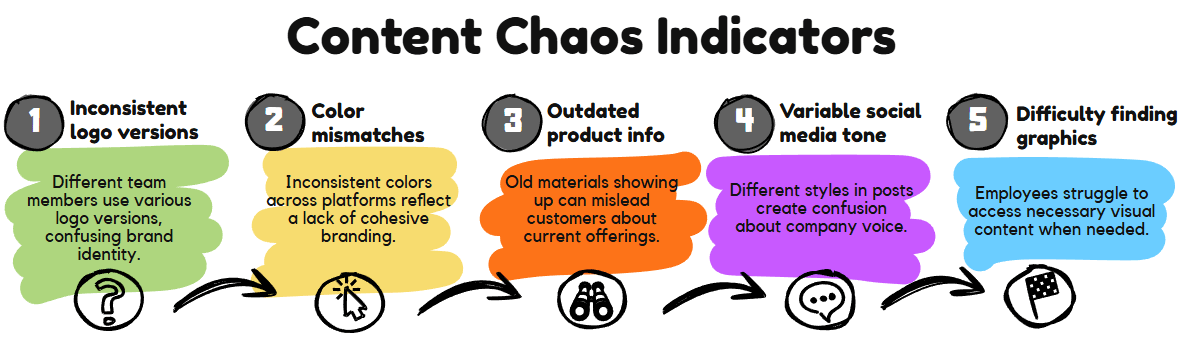
Here are the warning signs of content chaos:
- Different team members use different versions of your logo
- Your website colors don’t match your business cards
- Old product information shows up in new marketing materials
- Social media posts don’t sound like your company
- Employees can’t find the right photos or graphics when they need them
The Real Cost of Content Chaos
Content chaos isn’t just annoying. It actually costs money and hurts your business in several ways.
Lost Sales and Confused Customers
When your brand looks different everywhere, customers get confused. They might not recognize your business across different platforms. Research shows that 89% of people are likely to buy again when their first brand experience is positive. But inconsistent branding makes that positive experience much harder to create.
Think about it: if your Facebook page uses blue colors but your website is red, and your business cards have a totally different logo, customers won’t know what to expect from your business.
Wasted Time and Money
Most marketing leaders (55%) say their companies have already suffered negative outcomes from “rogue content” including damaged reputations and less effective marketing. When content is inconsistent, your team wastes time:
- Recreating materials that already exist
- Fixing mistakes after they’re published
- Searching through messy folders for the right files
- Explaining brand guidelines over and over
One survey found that 77% of teams in large organizations struggle to meet rising demand for content. Small businesses feel this pressure even more.
Brand Damage That’s Hard to Fix
The average cost of brand damage caused by a single incident was approximately $8,000 for small and medium-sized businesses. While this study focused on security incidents, the same principle applies to brand consistency problems.
When your brand looks unprofessional or confusing, it’s hard to build trust with customers. 80% of consumers say they only trust brands with 4 to 5-star ratings. Poor branding makes it harder to earn those good ratings.
How Small Businesses Can Fix Content Chaos
The good news? You don’t need a huge budget or a big team to get your content under control. Here’s how to start:
Create Simple Brand Guidelines
Write down the basic rules for your brand:
- Which logo to use and where
- Your exact brand colors (get the specific color codes)
- What fonts to use for headlines and body text
- Your brand voice (friendly, professional, funny, etc.)
- Rules for photos (bright and colorful vs. dark and moody)
Keep these guidelines simple. A one-page document is better than a 50-page manual that nobody reads.
Set Up a Central File System
Pick one place to store all your brand materials. This could be:
- A shared Google Drive folder
- Dropbox Business
- A simple cloud storage system
Organize files clearly:
- Logos folder (with different file types and sizes)
- Photos folder (organized by category)
- Templates folder (for common documents)
- Current materials folder (newest versions only)
Delete old versions so people don’t accidentally use outdated materials.
Use Templates for Common Tasks
Create templates for things your team makes often:
- Social media post templates
- Email newsletter layouts
- Sales presentation slides
- Business card designs
- Invoice layouts
Templates save time and keep everything looking consistent. Even someone who’s not a designer can create professional-looking materials.
Train Your Team
Make sure everyone knows:
- Where to find brand files
- Which materials to use for different purposes
- Who to ask when they have questions
- How to request new materials
Training your team in brand guidelines is essential for maintaining consistency, especially for design and marketing teams constantly creating new content.
Review Before Publishing
Set up a simple approval process:
- Have one person check important materials before they go public
- Create a checklist for brand elements (right logo, colors, fonts)
- Review social media posts before scheduling
- Double-check printed materials before ordering
This doesn’t have to slow things down. A quick 5-minute review can prevent costly mistakes.
Tools That Can Help
You don’t need expensive software to get started. Here are some budget-friendly options:
For File Storage:
- Google Drive (free for basic use)
- Dropbox (affordable monthly plans)
- OneDrive (comes with Microsoft Office)
For Creating Materials:
- Canva (has free and paid versions with templates)
- Adobe Express (user-friendly design tool)
- Google Slides (free for presentations)
For Team Communication:
- Slack (keeps brand discussions organized)
- Microsoft Teams (good for file sharing)
- Simple shared documents for guidelines
Start Small and Build
You don’t have to fix everything at once. Start with the materials you create most often. Maybe that’s social media posts or email newsletters. Get those consistent first, then move on to other content.
According to the lean brand management approach, the entire company should be responsible for maintaining brand consistency, not just a brand manager. This works well for small businesses where everyone pitches in.
The Bottom Line
Content chaos might seem like a small problem, but it can seriously hurt your business. Customers notice when your brand looks messy or unprofessional. They’re less likely to trust you and buy from you.
The solution doesn’t require a huge investment. With some simple guidelines, organized file storage, and basic training, you can get your content under control. Your brand will look more professional, your team will work more efficiently, and your customers will have a better experience.
Start today by picking one area to clean up. Maybe it’s organizing your photos or creating a simple style guide. Small steps add up to big improvements.
Remember: your brand is one of your most valuable business assets. Protecting it from chaos is protecting your future success.
Content chaos is costing small businesses real money. When your logo looks different on every platform and your team can't find the right files, customers get confused and sales suffer. The fix? Check out this article. Share on X“Marketing Monday” articles archive.

Note: Some links on this page are affiliate links meaning that if you click on my link and make a purchase, I will receive a small commission. It does not however affect the price you pay. Plus, it’s a great way to support me and the content I’m providing.










